THE GADGET IN MIND TAKE
Shortlist for a person or small team using ScanSnap workflows. Check application compatibility before assuming it replaces a business capture scanner.
Consider it for
Offices that want accessible scan profiles and Wi-Fi or USB connections.
Look elsewhere for
Workflows that require a standard TWAIN or ISIS scanner driver.
Speeds and capacities are manufacturer ratings, not our test results. Available cloud destinations, software bundles and functions can depend on firmware, service and region.
THE USEFUL DETAILS
Key specifications
- Rated scan speed
- Up to 45ppm / 90ipm at stated A4 settings
- Feeder
- Up to 100 A4 sheets at 80g/m²
- Connection
- USB + Wi-Fi 6
- Controls
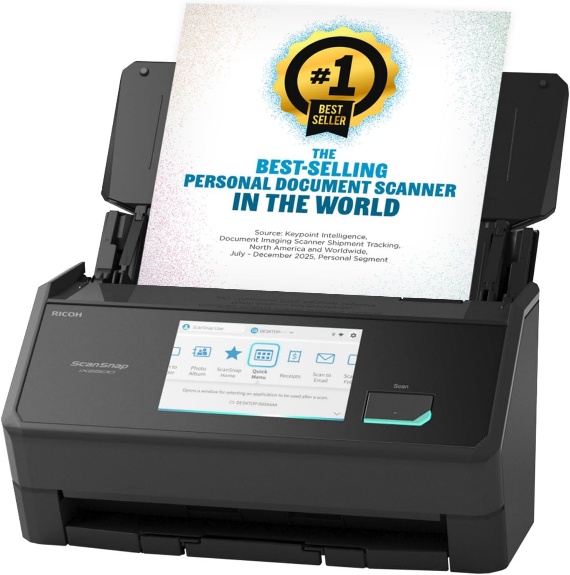
- 5-inch touchscreen
- Software / driver
- ScanSnap Home; no TWAIN / ISIS
- Colour in supplied listing
- Black
Manufacturer platform features and exact seller configurations are different things. “Supplied listing” identifies details taken from the title supplied to us.
Reasons to consider
- Touchscreen access to scan profiles
- Wi-Fi plus USB rather than a single connection method
- 100-sheet rated feeder for batches of standard office paper
Trade-offs to weigh
- No TWAIN / ISIS support
- Cloud workflows need destination and access checks
- No wired Ethernet interface listed
THE OFFICE PERSPECTIVE
Choose the workflow first
The iX2500 is the option to consider when more than one person needs a convenient way to select a scan destination. Our assessment is that accessible profiles can be more valuable than chasing a small difference in rated engine speed. Establish who scans, where files should go and who should be able to access them.
Integration is the main boundary
ScanSnap uses its own software and driver. A document-management application expecting TWAIN or ISIS is therefore a compatibility question to resolve before purchase. Do not assume that a scanner supporting PDFs can connect directly to every records system.
Treat rated throughput realistically
The published 45ppm rating applies to stated document and scan settings; feeder capacity also depends on paper. Preparation, OCR, indexing and quality checks affect the full job. We have not measured completed-job time, feeding reliability or OCR accuracy. Use sample documents to validate those during a deployment trial.
BEFORE YOU BUY
Three checks worth making.
- Confirm your document-management application supports the workflow
- Check local / cloud destinations and access settings
- Verify software bundle, OS support and Canadian warranty
Affiliate link · We may earn a commission at no additional cost to you.
View on Amazon.caCheck current price, seller, configuration and availability on Amazon. Opens a new tab.
CHECK OUR WORK
Sources & review limits
Model and platform facts are drawn from the references below. Workload suitability and purchasing priorities are our editorial inferences.
- Ricoh / PFU — ScanSnap iX2500 ↗Manufacturer documentation · consulted 21 Oct 2026
The retailer reference is Amazon.ca ASIN B0F9B1H5VN. Direct listing access was blocked during research; indexed details, where available, are not a substitute for the current seller offer. We have not verified current pricing, stock, seller identity or service eligibility.
No benchmark, star rating, customer quote or hands-on result has been invented. Read the full review method.